문제 상황
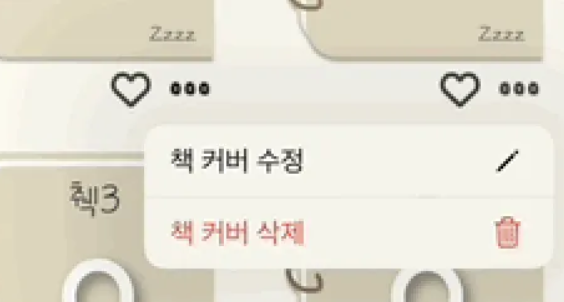
버튼을 클릭했을 때, UIMenu를 띄워봅시당
문제 해결
UIButton의 menu
/// An optional menu for the button to display. The button will automatically enable or disable its contextMenuInteraction when a non-nil or nil menu is set. Defaults to nil.
@available(iOS 14.0, *)
@NSCopying open var menu: UIMenu?
UIButton에는 Menu라는 프로퍼티가 있다.
iOS 14버전 이상부터 쓸 수 있음 !!
dropDownButton.menu = UIMenu(
    title: "",
    children: [
        UIAction(
            title: "책 커버 수정",
            image: UIImage(systemName: "pencil"),
            handler: { _ in dropDownButtonEditAction() }
        ),
        UIAction(
            title: "책 커버 삭제",
            image: UIImage(systemName: "trash"),
            attributes: .destructive,
            handler: { _ in dropDownButtonDeleteAction() }
        )
    ]
)
근데 기본적으로 버튼에 들어가는 menu는 꾹 눌러야 메뉴가 뜬다.
그러면 나처럼 클릭했을 때 바로 menu가 보이게 하려면 어떻게 할까 ??
처음에 addAction이나 addTarget에 넣어야 하나 했지만, 이런게 있었다
얘를 true로 설정해주면 버튼을 꾹 누르지 않고도, 클릭 한 번으로 메뉴를 나오게 할 수 있다 !!
/// If the contextMenuInteraction is the primary action of the control, invoked on touch-down. NO by default.
@available(iOS 14.0, *)
open var showsMenuAsPrimaryAction: Bool
수정된 나의 코드
dropDownButton.showsMenuAsPrimaryAction = true
dropDownButton.menu = UIMenu(
    title: "",
    children: [
        UIAction(
            title: "책 커버 수정",
            image: UIImage(systemName: "pencil"),
            handler: { _ in dropDownButtonEditAction() }
        ),
        UIAction(
            title: "책 커버 삭제",
            image: UIImage(systemName: "trash"),
            attributes: .destructive,
            handler: { _ in dropDownButtonDeleteAction() }
        )
    ]
)
배운 점
- 버튼 안에 있는 UIMenu 사용
- 꾹 눌러야 나오는 UIMenu를 클릭 한 번으로 할 수 있게 하는 showsMenuAsPrimaryAction를 알게 됨
참조 링크
'📱 iOS > UIKit' 카테고리의 다른 글
| [문제해결] UITableViewCell에서 CornerRadius 개별 설정 시 초기 레이아웃 문제를 비동기 재귀로 해결하기 (1) | 2025.02.28 |
|---|---|
| [UIKit] 뷰의 Corner Radius 각각 다르게 처리하기 (with CACornerMask, UIBezierPath, CAShapeLayer) (0) | 2025.02.28 |
| [UIKit] CollectionViewCell 드래그 앤 드랍 구현하기 (0) | 2024.12.01 |
| [UIKit] iOS 15.0 이상에서 UIButton 안에 있는 이미지 사이즈 조절하기 (4) | 2024.11.15 |
| [UIKit] 런타임 시점에 Constraint를 조절하여 애니메이션 구현하기 (2) | 2024.11.14 |